Start writing here...
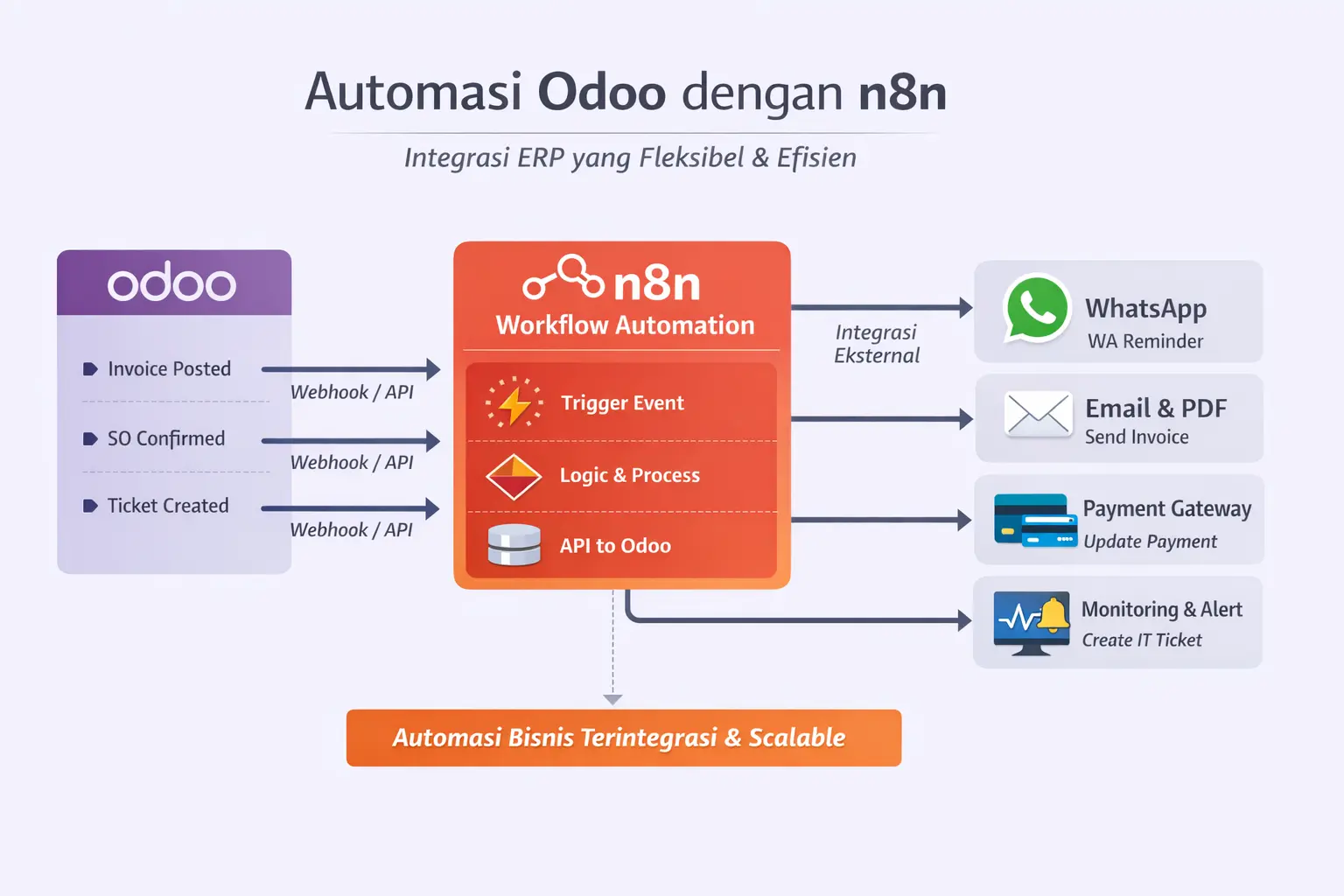
In the era of digital transformation, companies not only needa stable ERP, but alsoautomated, flexible, and easily integrated workflowswith various external systems.
One increasingly popular approach isto combine Odoo with n8nas a workflow automation engine.
Workflow Challenges in Traditional ERP
Many companies use Odoo as their core ERP, but face challenges such as:
Workflows are too rigid
Custom modules are expensive and hard to maintain
Integration with WhatsApp, Email, Payment Gateway, or Monitoring is not flexible
Difficult to create cross-system automation
This is wheren8n plays a role as a workflow automation layeron top of Odoo.
What is n8n and Why is it Suitable for Odoo?
n8nis a platformfor open-source workflow automationthat allows integration between systems with alow-code.
Advantage of n8n for Odoo:
Integration viaWebhook & REST API
Easily developed without changing the core of Odoo
Supports multiple services (WhatsApp, Email, Slack, Payment, Cloud)
Can be self-hosted (on-premise / cloud)
Odoo focuses onbusiness process, n8n focuses onautomation & orchestration
Automation Workflow Patterns
1. Odoo Triggers n8n Workflow
Odoo sends events to n8n via webhook.
Example events:
Invoice posted
Sales Order confirmed
Ticket status changed
New lead entered CRM
n8n then:
Checks conditions
Runs subsequent processes
Sends notifications or updates other systems
2. n8n Updates Data to Odoo
n8n can also:
Create data in Odoo
Update invoice status
Close tickets
Add activities or logs
All done viaOdoo REST APIsecurely.
3. Scheduled Workflow (Cron Automation)
Workflows run automatically based on time.
Example:
Invoice due reminders
Automatic sales follow-ups
Escalation tickets > 48 hours
Generate reports and send emails
Example Automation Use Case
A. Automatic Invoice Reminder
n8n daily cron job
Fetch overdue invoices from Odoo
Loop per customer
Send WhatsApp & Email reminders
➡Without custom module reminder in Odoo.
B. Integrated WhatsApp Helpdesk
Incoming WhatsApp
n8n parsing messages
Create ticket in Odoo
Auto reply ticket number & status
Example :https://integra.isi.id/our-product/integracampaign
C. Payment Gateway Automation
Payment gateway sends webhook to n8n
Payment validation
Update Odoo invoice
Send PDF invoice to customer
Usage Example :https://integra.isi.id/our-product/shopup
D. Monitoring & Alerts to Odoo
Prometheus / Kubecost Alerts
Enter n8n
Create IT ticket in Odoo
Send notification to WhatsApp Admin
Security & Best Practices
To be safe and scalable, consider:
UseAPI Key for integration
Do not expose sensitive Odoo endpoints to the public
Use HTTPS and IP whitelisting
Logging & retry mechanism in n8n
Separate critical and non-critical workflows
When to Use n8n vs Odoo Custom Module?
This is an interesting question, because Odoo itself already supports custom modules & Scheduler Actions, here are some reasons when to use n8n or vice versa
Use n8n if:
Cross-system integration
Dynamic workflows
Fast & flexible automation
Use Odoo Custom Module if:
Core accounting logic
Critical business validation
Very high performance