ERP & MRP
For medium-scale manufacturing company owners, searching for an ERP system often feels like choosing between two difficult things to combine:a truly integrated system(production, warehouse, and accounting working together) ora reasonable price for MSME/medium scale. Most enterprise systems are actually expensive because they are sold per module, while cheap systems usually only solve part of the problem (for example, only stock recording, without automatic production cost calculation).
This article takes a real case study from one of the plastic folding mat manufacturers in Blitar, East Java, to answer the questions often asked by medium manufacturing company owners:what are the initial needs of a factory (machines, raw materials, processes), and which parts can be solved by Odoo Enterprise— as well as why Odoo is relevant for companies of similar scale.
A brief summary for those of you comparing ERP systems:
- The medium manufacturing industry has a phased process (not just buy-sell), so it needs a system that connectsproduction, warehouse, and accountingin a single flow — not three separate systems.
- This case study shows how Odoo Enterprise meets these needs: from BOM, Work Center, Quality Control, Shop Floor, MPS, Replenishment, to Chart of Accounts and regional reporting.
- At the end, it is also explained why Odoo Enterprise is relatively affordable for medium scale — including a per user licensing scheme (not per module).
Business Overview
- Products are sold domestically through agents in Java, Sumatra, and Kalimantan.
- There is no e-commerce or export yet.
- The business model looks simple from the outside: buy raw materials → production → sell to agents.
- The real complexity only becomes apparent once you enter the production floor.
Machine Requirements (Work Center)
The production of PP mats goes throughfour sequential stages, each requiring its own machine or work area:
- Stage 1 — Extrusion (Extruder Machine)Melting & molding PP plastic pellets + masterbatch + additive into plastic rope (raffia).
- Stage 2 — Winding (Thread Winding Machine)Winding colored threads (green, orange, gray, white) into ready-to-weave rolls.
- Stage 3 — Weaving (Weaving Machine)Weaving plastic rope + wound thread according to the pattern into mat sheets.
- Stage 4 — Finishing (Finishing/Packing Area)Attaching edge tape, sewing, attaching labels, and packaging into finished products.
Each stage produces semi-finished goods (WIP) that become the input for the next stage — meaning a single miscalculation in the early stage will propagate throughout the entire production chain.
Raw Material Requirements
- PP plastic pellets— purchased in tons, but consumed in kilograms on the production floor.
- Colored thread— 4 variants (green, orange, gray, white), each from different branded vendors, thus treated as separate products, not just color variants of a single parent product.
The difference between purchase units and usage units, combined with the many variants of raw materials per color and size, is a major source of miscalculations when everything is still done manually in Excel.
Main Pain Point: Human Error in Calculations
Before the implementation of Odoo, all calculations for raw material requirements, unit conversions, and production costs were done through manual spreadsheets. This led to several classic problems:
- Calculating raw material requirements per production batch is prone to miscalculation, especially when there are unit conversions (Tons → Kg).
- There is noclear traceabilityfrom vendor → raw materials → semi-finished goods → finished products.
- The Cost of Goods Sold (COGS) is inaccurate, as costs at each production stage are not recorded in real-time.
- Determining product grade (Grade A/B/C) — which is only knownafterthe production process is completed — is difficult to trace its impact on inventory and costs.
What Odoo Can Do for Cases Like This
The implementation of Odoo Enterprise in such cases focuses on five core modules:Purchase, Inventory, Manufacturing (MRP), Sales, and Accounting— with a roadmap extending to CRM and HR.
1. Hierarchical Bill of Materials (BOM) per Machine
- Each stage of production is mapped into its own BOM, following the flow of physical machines: BOM Extrusion, BOM Winding (one BOM per thread color), BOM Weaving, and BOM Finishing.
- Odoo automatically calculates the raw material requirements from finished products to raw materials, without manual calculations in Excel.
2.Work Center & Routing— Complete with Cost per Machine
Each machine is registered as a Work Center with a clear production route: Extrusion → Winding → Weaving → Finishing. What makes this setup "speak" is not just the order of the machines, but also the costs associated with each machine:
- Each Work Center is assignedTime EfficiencyandOEE (Overall Equipment Effectiveness) targets— for example, the Weaving machine has a different efficiency target than the Extrusion machine, due to the characteristics of the process and its failure rates.
- Each Work Center also has2 cost components per hour: machine/overhead costs and labor costs (operator). Both vary in value at each stage — the Weaving and Finishing machines, which involve more manual labor (weaving, sewing, packaging), have a larger portion of labor costs compared to the more automated Extrusion machine.
- The combination of work duration (from Operations in the BOM) and cost per hour is what allows Odoo to calculatethe actual operating costs per production batch.automatically — not an average overhead figure as commonly used in manual calculations.
- This also opens up opportunities for measuring machine efficiency (OEE) in the future: Odoo can compare productive time vs downtime per Work Center, something that is impossible to do without consistently recording data per machine.
Limitations to be aware of:in Odoo, each Work Center only hasone slot for "Expense Account"to record its operating costs in the books. Therefore, the costs of electricity/utilities for the machine and the depreciation costs of the machinecannot be automatically recorded separatelyonly through one Work Center — a decision is needed on which costs are directed to that account, and which need to be recorded through another channel (for example, the Fixed Asset module for monthly depreciation).
3. Quality Control — 3 Checkpoints
QC is not only performed at the end of production, but is mapped to 3 points along the flow from raw materials to finished products:
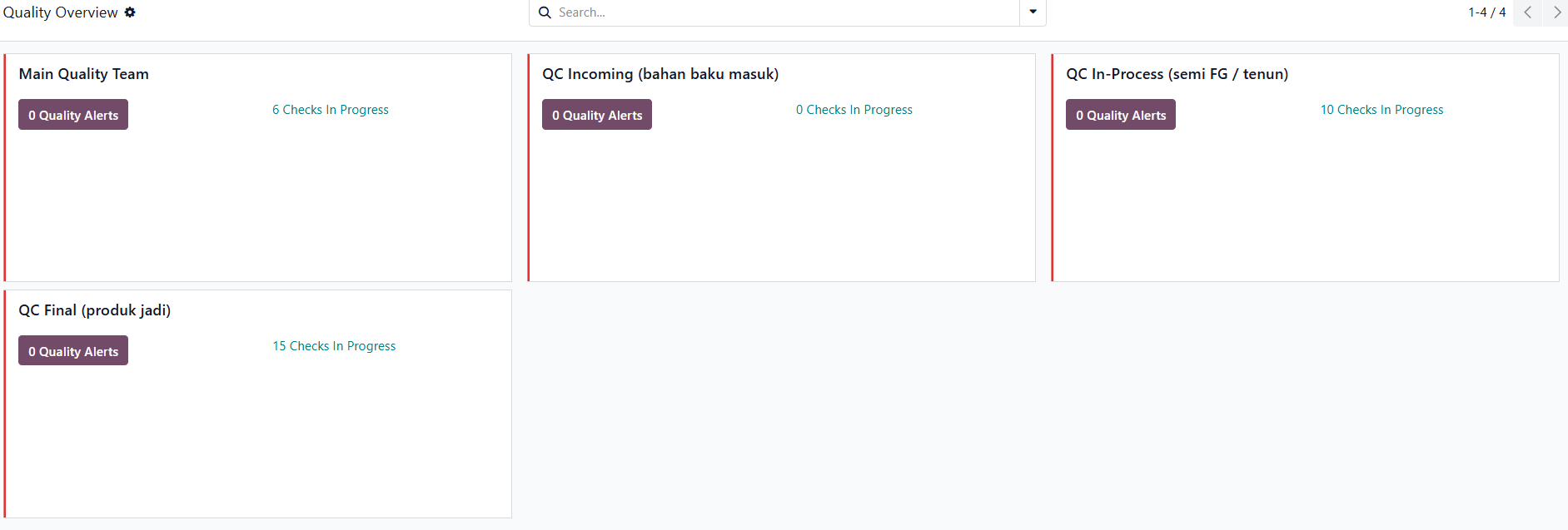
- QC Incoming— inspection when raw materials are received from the vendor: PP plastic pellets are visually checked (contamination, moisture content/RH), colored threads are checked for density & color matching before entering the raw material warehouse.
- QC In-Process (Semi FG)— performed after the Weaving stage: checking the density of the weave and whether there are broken or defective threads, before the mat sheets proceed to the Finishing stage.
- QC Final— performed after the Finishing stage: weighing each sheet/product, checking dimensions & patterns according to size (70/180/200 cm), and determining Grade A/B/C.
- Quality Alert & Quarantine— every failed QC result (Fail) automatically triggers a Quality Alert and the product is moved to the Quarantine location (QC/WH-QRN Zone) for rework or scrap decision — it cannot proceed to the next stage until resolved.
- Because tolerance standards differ for each size, the QC points for the finished product dimensions are separated by size (not a single generic point for all variants).
The complete flow of how a product can become Grade B, Grade C, or reject:
- Raw materials received → QC Incoming— Pass goes to the raw material warehouse; Fail goes to Quarantine, then returned to the vendor or scrapped (becoming a direct cost).
- Weaving completed → QC In-Process— Pass goes to Finishing; Fail is immediately scrapped (not downgraded), so the same production cost must be divided among fewer finished units — HPP per piece automatically increases.
- Finishing completed → Manufacturing Order "Produce All"— the system always records all output asGrade Ainitially, because the actual grade cannot be determined until Final QC.
- Final QC (per unit)— Pass without notes remains Grade A; minor defects are manually reclassified toGrade B; more significant defects (but still sellable) toGrade C; not sellable at all is immediately scrapped.
The key point: the grade decision pointsare spread across 3 different locations.(Incoming, In-Process, Final) — not a single point at the end. Rejects at the early stage never become a low Grade; they immediately become production losses (scrap); Grade B/C only applies to units that are finished products but below the ideal standard. Since each reject and reclassification is recorded as a journal, its impact on the Cost of Goods Sold (COGS) and margin is directly visible per batch.
4. Shop Floor — Real-Time Production Recording
The Shop Floor module replaces manual recording on paper/spreadsheet by recording work progress directly from the production floor:
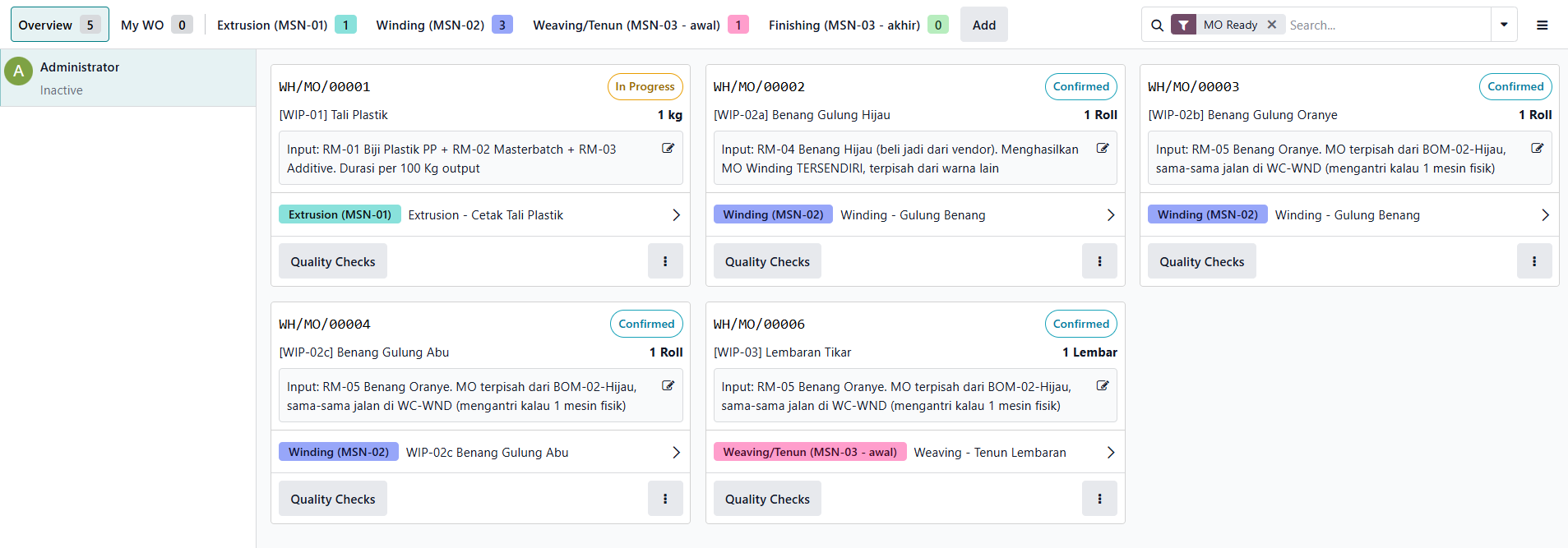
- Operators recordStart / Pause / Donefor each Work Order through tablets placed at each Work Center (Extrusion, Winding, Weaving, Finishing).
- Work instructions and mandatory Quality Checks to be completed are displayed directly on the screen, so the Work Order cannot be marked as complete until the related QC passes.
- Downtimeandreject/scrapare recorded directly by the operator with reason codes such as thread scrap, weaving scrap, finishing scrap, and raw material reject — this data becomes the basis for calculatingOverall Equipment Effectiveness (OEE)automatically.
- Supervisors/Production Managers can monitor the position of each batch in real-time, knowing which machine stage it is at, without waiting for manual reports from the production floor.
- Shop Floor data becomes the primary source for Work Orders Analysis, OEE, and Production Analysis — replacing the daily production recap that was previously done manually.
5. Full Traceability
- Every raw material and WIP is recorded as a product with stock movements being tracked.
- The company can trace a finished product back to the batch of raw materials and its original vendor — something that is difficult to do consistently with manual recording.
6. Product Variant in Inventory
- The finished product has 9 SKUs: a combination of 3 sizes (170×300, 180×300, 200×300 cm) and Grade A/B/C.
- Because the Grade is only knownafterproduction is completed (Final QC results), Grade A/B/C is created as3 separate product templates— not as a single variant attribute within one product. Each template then has Size variants within it.
- This approach makes changes in Grade (for example, reclassification from Grade A to Grade B after defects are found) recorded as stock transfers between product templates, ensuring that history and quantities remain accurate in Inventory.
- Semi-finished goods (WIP) such as Mat Sheets also use Size variant attributes, so that one WIP product can represent 3 different sizes without creating separate WIP products for each size.
7. Cost of Goods Sold (COGS) and Automatic Accounting Journal
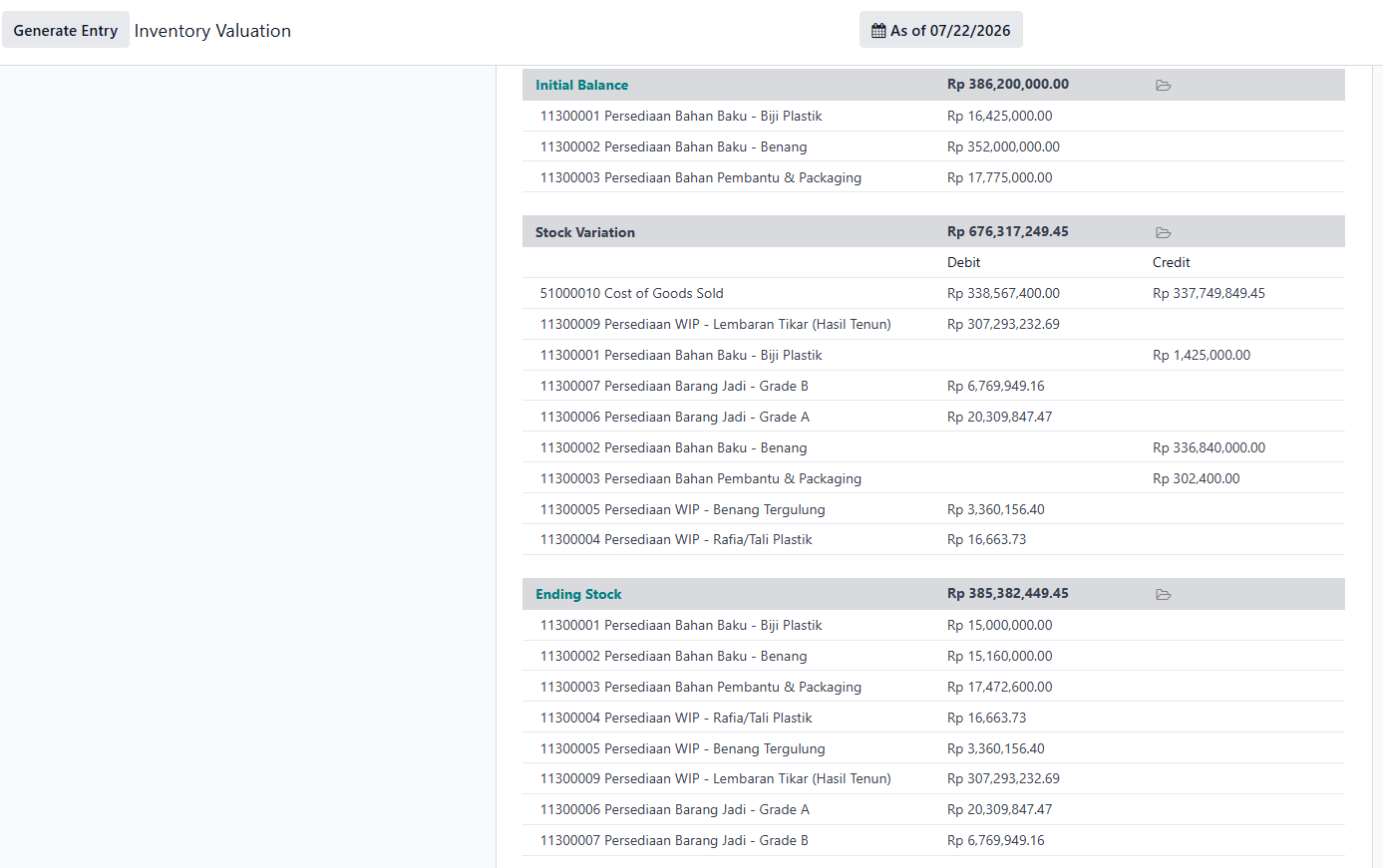
- Every consumption of raw materials and completion of production stages automatically forms an accounting journal (WIP, Cost of Goods Manufactured, up to COGS).
- Management can see the actual production costs per batch without waiting for manual recaps at the end of the month.
8. Adjustment of Chart of Accounts (COA)
- The standard Odoo COA is expanded with a special WIP account to accommodate the value of semi-finished goods (Mat Sheets) that have not yet become finished products, so that inventory valuation remains accurate at each stage of production.
- Added account groupSales Expensesto record costs that were previously mixed in the general account, such as shipping costs, sales commissions, and other sales claim expenses — so that the sales margin per order can be calculated more accurately.
- A new account has also been addedElectricity & Factory Utilities Expense, which is set up as an Expense Account across all Work Centers (Extrusion, Winding, Weaving, Finishing). This way, every time a Work Order is completed and machine operating costs are recorded, the electricity/utilities production costs are automatically recorded to this account — not mixed into the general expense account as before.
- Since the Work Center only has one slot for an Expense Account, this electricity account is prioritized to be placed there, while machine depreciation costs are recorded through a separate accounting path (Fixed Asset) so that both remain clearly visible in the financial reports without obscuring each other.
- For the need to segment accounts receivable (AR) by customer category, the recommended approach is to usePartner Tagsfiltered in the Partner Ledger report — rather than creating separate AR accounts for each customer category. This avoids bloating the COA while still providing visibility of receivables by segment.
- The separation of new AR accounts is considered if the Finance team explicitly needs a separate balance sheet for each customer category.
9. Analytic Account by Region for Reporting
Since distribution is done from one physical warehouse to various regions (Java, Sumatra, Kalimantan), the separation of sales performance by regionis not done by creating virtual warehouses, but throughAnalytic Accounting:
- An Analytic Plan named has been created"Sales Region", with a hierarchical structure:Island → Province(for example, Java → East Java, Central Java, West Java, DKI Jakarta, DI Yogyakarta, Banten; similarly for Sumatra and Kalimantan).
- This Analytic Account is automatically filled in the Sales Order and Invoice based on the customer's region, without the need for additional customization.
- With this structure, the following reports can be presented from the company level to the provincial level:Profit & Loss, Total Sales, Quantity Sold, Gross Profit, COGS, Customer Outstanding, Sales per Customer, Sales per Salesperson, and Sales Trend.
- This hierarchical structure also facilitates the addition of new marketing regions in the future (for example, Sulawesi or Bali & Nusa Tenggara) without changing the existing system design or report structure.
- If in the future the company opens branch warehouses in other regions, this scheme will need to be supplemented with Multi-Warehouse — however, for the current situation, one physical warehouse + Analytic Accounting is sufficient to meet the reporting needs per region.
10. Real-Time Reports
- Stock report, Manufacturing Order status, and Work Order progress are available in real-time through the dashboard.
- Replacing the need for manual recaps that have consumed the time of the production and finance teams.
11. Master Production Schedule (MPS)
MPS is used to plan the production of finished products based on monthly targets/forecasts, rather than waiting for Sales Orders to come in one by one:
- For each finished product (for example, PP Mat Grade A by size), fill inBOMused,Routeproduction (Manufacture),Safety Stock Target(minimum stock that is always maintained), andMinimum to Replenish(minimum amount for each production/batch).
- Replenishment Triggercan be setManual(Manufacturing Order is created after being checked and clicked by the Production Planner) orAutomatic(Odoo automatically creates MO when stock projections are below target).
- MPS provides monthly visibility: how much needs to be produced, when, and whether the raw material stock is sufficient for that target — before production decisions are made, not after shortages occur.
12. Replenishment — Make to Order (MTO) and Reordering Rules
There are two complementary stock replenishment mechanisms:
- Make to Order (MTO) tiered— each WIP product (Plastic Rope, Spool Thread by color, Mat Sheets) is given a routeManufacture + Replenish on Order. This means that one Manufacturing Order for finished products (Finishing) automatically "pulls" the creation of MO for the previous stage (Weaving), which then pulls MO Winding and Extrusion — all chained automatically according to the required quantity, without needing to manually calculate how many MO need to be made at each stage.
- Reordering Rules for raw materials— raw materials such as plastic pellets and colored thread are given reorder points based on minimum stock, taking into account the lead time for delivery from vendors. When stock hits this threshold, the system automatically proposes a Purchase Order — replacing the habit of manually checking warehouse stock before ordering raw materials.
13. Scrap — Recording of Reject Items
The Scrap feature is used whenever there are raw materials or semi-finished goods that cannot proceed to the next stage (either due to failing QC Incoming or QC In-Process in Weaving):
- Each scrap occurrence is recorded witha specific reason code— for example, thread reject, woven product reject, or raw material reject — so that management can see patterns: which stage most frequently produces rejects.
- Scrapped items are moved toa Scrap locationspecifically (separate from normal stock locations), and their value is automatically removed from inventory and recorded as production costs — no longer recorded as an asset that is "hanging" in the stock report as often happens with manual recording.
- Because it is recorded as an official transaction (not an informal note on paper), this Scrap data becomes part of historical data that can be analyzed to reduce the reject rate over time.
Location Structure within One Physical Warehouse
Although the company only has1 (one) physical warehouse, within Odoo that warehouse is divided into severallogical locationsso that the movement of goods can still be tracked according to their stages — without the need to physically build a new warehouse:
- Raw Material Location— the storage place for plastic pellets and colored threads before entering production.
- Process/WIP Location— the place where semi-finished goods (plastic ropes, spooled threads, mat sheets) are located while still in the production stage.
- Finished Product Location— the place where finished products (PP Mats of all sizes & grades) are stored before being sent to agents.
- Quarantine Location— a temporary place for items that failed Quality Check, waiting for a decision on rework or scrap.
- Scrap Location— a place for items that have been decided cannot be used anymore, before their value is removed from inventory.
With these five logical locations, a single physical warehouse can still provide visibility like several warehouses — items can be tracked at which stage they are, without changing the real conditions in the field or unnecessarily splitting stock virtually.
Production Scenario Simulation Results
Before the above concept is fully implemented, a simulation is conducted to prove that the automatic calculations are truly functioning as expected — not just a concept on paper.
Simulation setup:
- Simulation batch:100 pcsPP Mats size 180×300 cm.
- Involves 4 production stages with separate accounting journals at each stage (Extrusion → Winding → Weaving → Finishing).
- 2 Grade scenarios are compared to see the impact of variability in production results on costs and margins.
How costs are formed at each stage:
- Each stage consumes raw materials/WIP from the previous stage, plus labor costs and Work Center overhead, then enters the accountWIPas ongoing costs.
- When the final stage (Finishing) is completed, all accumulated WIP costs are transferred to the inventory valueFinished Products, so that the cost per unit is immediately visible once the batch is completed — without waiting for a manual recap at the end of the month.
- Because each stage is recorded as a separate journal, costs can be traced: how much of the cost comes from raw materials, how much from labor, and how much from machine overhead at each stage.
Important finding — the grade is only known at the end of the process:
- When the Manufacturing Order is executed ("Produce All"), the system always generates the initial output asGrade A(initial production target) — because the actual grade is only known after the Final QC inspection.
- Reclassification to Grade B or C (if any) is doneafterthe QC results are out, through the mechanism of inter-product stock transfer (part of the customization needs for Grade A/B/C described earlier).
Two scenarios are compared to see their impact on Owner/Finance:
- Ideal Scenario— all batch output results in Grade A. The highest margin is achieved and the cost per unit is the lowest, but this is a best-case assumption that rarely occurs in the field.
- Realistic Scenario— batch output is mixed between grades according to actual production conditions. The margin decreases compared to the ideal scenario because some output has a lower selling value (Grade B/C), but this figure much more accurately reflects the real conditions on the production floor.
Why this result is important for the reader:
- This simulation proves that the difference in grade results — which has been "lost" in manual recaps because it was only known later — can now be directly seen in its impact on the margin per batch.
- Owners and the Finance team now have a more realistic picture when setting production targets and selling prices, compared to relying solely on ideal cost assumptions as in previous manual calculations.
- This is concrete evidence that MRP does not just calculate "how much material is needed", but also reveals the variability of actual costs that have previously gone unnoticed by management.
Why Choose Odoo Enterprise
Beyond the technical configurations above, there are several advantages of Odoo Enterprise that make it suitable for the needs of medium-scale manufacturing industries like this:
- One system, many integrated modules— Purchase, Inventory, Manufacturing, Sales, and Accounting operate on the same platform, allowing data to flow automatically between modules without the need for additional integration or manual re-entry.
- Full support for the Indonesian language— the interface, terminology, and even report formats can be displayed in Indonesian, facilitating adoption by production floor operators and staff who are not familiar with technical English terms.
- Mobile & Tablet App— the Shop Floor, Inventory, and Quality modules can be accessed directly from tablets or mobile devices on the production floor, so operators do not need to return to a computer/office just to record work progress or QC results.
- Scalable with business growth— additional modules such as CRM, HR, Maintenance, and Expenses can be activated gradually as needed, without the need to migrate the system from scratch.
- Affordable licensing— the Odoo Enterprise licensing scheme is calculated per user, not per module. This means that with one user license, the team can access all activated modules (Purchase, Inventory, Manufacturing, Sales, Accounting, and so on) without additional costs per module — unlike many other ERP systems that require separate license purchases for each module.
- Truly integrated MRP, not a separate add-on— the Manufacturing (MRP) module runs on the same platform as Inventory and Accounting, so BOM, raw material consumption, and production cost journals are natively interconnected, not the result of synchronization between systems that is prone to data discrepancies.
- Built-in real-time reports & dashboards— reporting features (Production Analysis, OEE, Stock Report, Profit & Loss per Analytic Account) are available directly without the need to build a separate dashboard from scratch.
- Official support & continuous updates— as an enterprise product, it receives official support and periodic feature updates, unlike internal spreadsheet systems that rely entirely on one or two people who understand it.
This combination of advantages makes the migration process from manual spreadsheets to Odoo Enterprise not just a "tool change", but a transformation in the way of working towards a more measurable, traceable system that is easy for the entire team to adopt — from the production floor to the Finance desk.
Screenshot
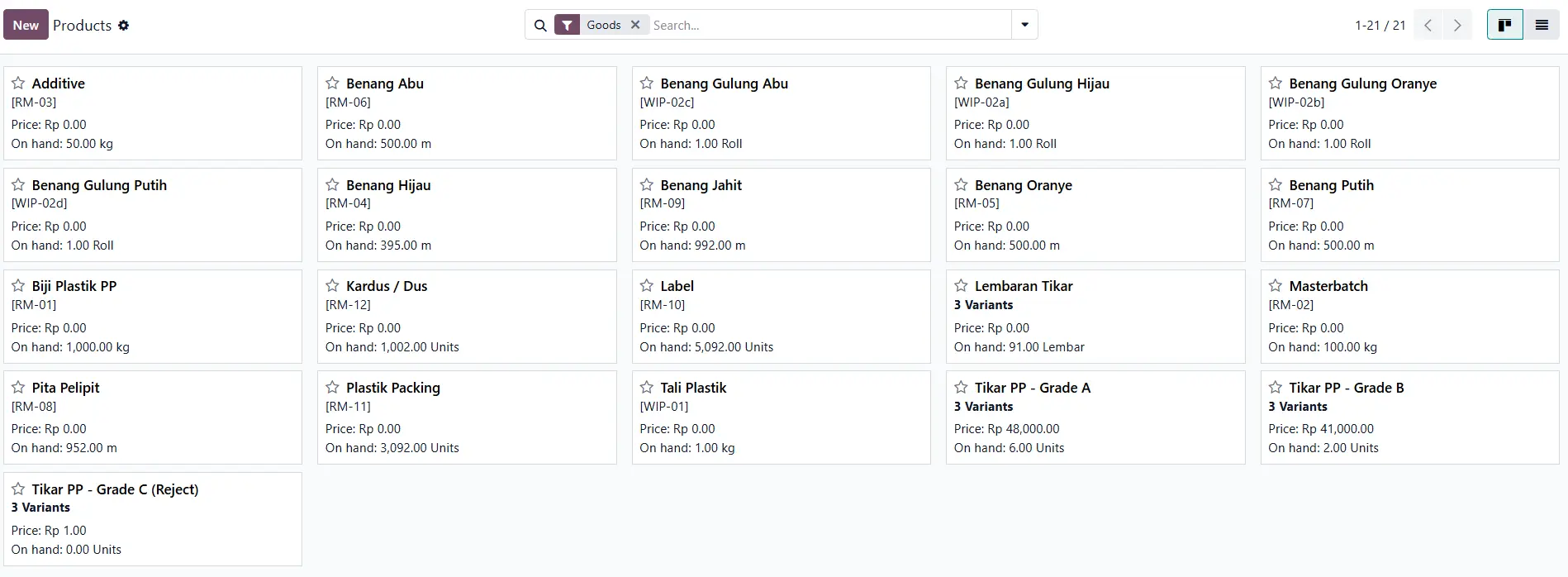
- List of products from Raw Material - WIP - Finished Good (Mats with Variant and Grade)
2. BOM (Bill Of Material)
3. Work Center and Costing Information

4. Quality Control
5. Shop Floor
 6. Review Inventory Valuation
Conclusion
This case study shows that the main challenge in the plastic mat industry — and indeed many other medium-scale manufacturing industries in Indonesia — is not the complexity of the product, but rather thelack of a system that automatically connects production, inventory, and accounting.. With the right process mapping, Odoo Enterprise can transform processes that were previously prone to human error into measurable and traceable workflows from plastic pellets to finished mats — with a pricing scheme that remains reasonable for medium-sized companies.
Supporting Articles (References from Odoo.com)
For readers who want to delve deeper directly from the official Odoo source:
- Odoo Manufacturing App — an overview of the MRP, Shop Floor, Quality, and Maintenance modules in one platform.
- Everything You Need to Know About Material Requirements Planning (MRP) — an explanation of the MRP concept and why many SMEs still rely on manual spreadsheets.
- Master Production Schedule — Odoo Documentation — the official guide on how the MPS feature works as discussed in this article.
- Add Quality Controls — Odoo Documentation — the official guide to creating Quality Control points in the production flow.
- Odoo's New Pricing — the official explanation of the per-user licensing scheme that includes all modules, relevant for cost considerations in medium-sized companies.
- Odoo Pricing Page — details of the current official pricing packages for Odoo Enterprise
Start writing here...