For businesses that sell warranty products — from distributors of instrumentation equipment, electronics, to heavy machinery — the most common customer question is actually simple:"Is my product warranty still valid?"
The problem is, many businesses in Indonesia still answer this question the same way: open an Excel file, search for the invoice number, manually calculate from the shipping date. The process is slow, prone to miscalculations, and cannot be accessed by the customer service team in real-time.
AtIntegraERP, we built this solution directly within the Odoo system that the sales and warehouse teams use daily — without additional applications, without manual processes.
Common Problems Faced by SME Businesses
From implementation experience with several distributor and retail clients, there are three recurring issues related to warranties:
- Warranty start dates are inconsistent.Some businesses calculate from the invoice date, some from the shipping date — and both are often not the same due to logistics processes.
- Products with serial numbers need tracking per unit., not per order. One sales order can contain 10 units of goods with 10 different warranty dates if there is a partial shipment.
- The sales and customer service teams do not have quick accessto check warranty status without opening separate reports or asking the accounting team.
Solution: Integrated Warranty Tracking in Odoo
We built three interconnected components to address this issue:
1. Automated Warranty Report
A special report that pulls data directly from Sales Orders, Invoices, Deliveries, and Serial/Lot Numbers recorded in the system — without requiring any data re-entry by the user.
The warranty calculation logic is designed to follow real-world conditions:
- If the product hasa serial number, the warranty expiration date follows the date recorded in that serial number (more precise per unit of goods).
- If there is no serial number, the system automatically calculates fromthe invoice date + product warranty period(in months).
- The warranty status is automatically classified into four categories:Active, Expired, No Expiry, andNo Invoice(for cases where goods have been shipped but the invoice has not been issued).
This report can be filtered by customer, sales order number, or serial number — and grouped by status or customer for the monitoring needs of the customer service team.
2. Smart Button Directly in Sales Order
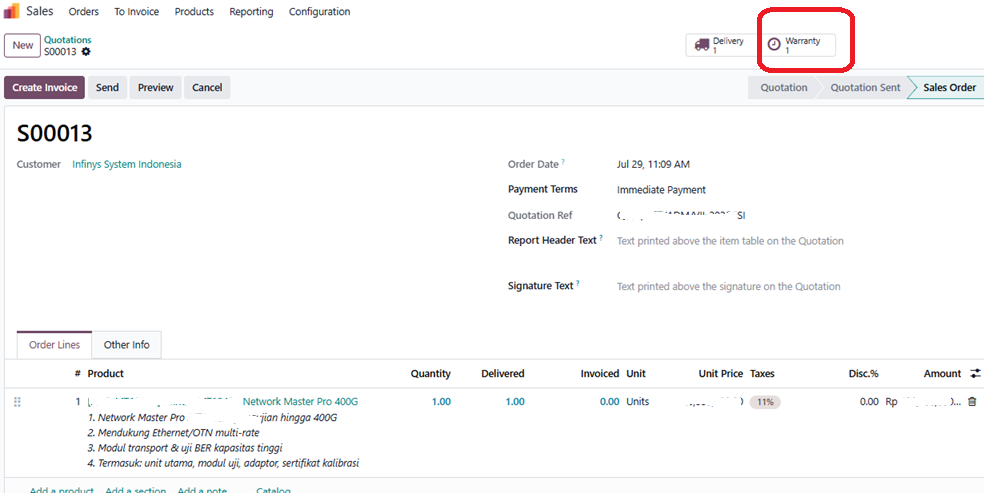
Instead of the sales team having to switch to a separate report menu, we addeda smart button "Warranty"directly on the Sales Order page — the same UI pattern as Odoo's built-in smart buttons like "Invoiced" or "Delivered".
This button:
- is automatically hiddenif the sales order does not have any warranty products, keeping the display clean for irrelevant orders.
- Displaysthe number of warranty recordsrelated to the order directly in large numbers on the button.
- When clicked, it directly opens the warranty detail list for that order — complete with status, serial number, and expiration date.
3. Always Real-Time Data
Since all this logic is built as an SQL view that pulls data directly from transaction tables (sales order, delivery, invoice, stock lot), this reportdoes not require additional synchronization or manual input. Once the invoice is posted or the goods are shipped, the warranty status is automatically updated.
Benefits for Business
This simple feature has a direct impact on operations:
- Customer servicecan directly answer customer questions about warranty status without waiting for other teams.
- The sales teamhas direct visibility from the order page they are working on.
- Managementhas aggregate data at any time to see how many units are still under active warranty — useful for projecting after-sales service costs.
Case Study: Instrumentation Distributor with Multi-Warehouse
This feature was first developed for a client in the instrumentation and fiber optic distribution industry, with specific needs: products sold in meters/rolls/drums, some with serial numbers per unit, and the invoicing process not always coinciding with the delivery of goods. This custom module is part of a broader implementation of Odoo 19, also including dual invoice numbering (VAT/Non-VAT) and field-based access control for sensitive data such as cost prices.
For those curious about the technical side (Functional & Developer)
For colleagues familiar with Odoo, here is an overview of the architecture behind this feature:
Reports are built as SQL Views (_auto = False), not a regular table model. This means no data is stored or duplicated — this report is purely the result of a real-time JOIN from the sale_order, sale_order_line, stock_move, stock_move_line, stock_picking, stock_lot, and account_move tables. The consequence: query performance remains light because Postgres handles the aggregation, and the data is always consistent with the original transactions — there is no risk of the report being "out of sync".
Some implementation details that may be relevant for other developer teams wanting to build similar features:
- Calculation of warranty expiration datesusing CASE WHEN to differentiate products with serial/lot tracking (taken from stock_lot.warranty_expiry_date) vs. products without tracking (calculated from invoice_date + month interval), with a fallback status of 'No Invoice' for items that have been shipped but not invoiced.
- Smart button in the Sales Order formusing the standard Odoo pattern: compute Boolean field for invisible control, and compute Integer field with widget="statinfo" to display numbers — exactly like the built-in smart button patterns such as "Invoiced" or "Delivered", to maintain UX consistency.
- Filter and group-by in search viewfollowing slight syntax changes in Odoo 19 compared to previous versions — some <group> structures for grouping filters need to be adjusted from the writing style in Odoo 17/18.
This approach is intentionally chosen to keep the module lightweight for maintenance and not to add database load with cron jobs or computed stored fields that need to be rescheduled.
One important detail: statusActive/Expiredthisis not calculated once and then stored, but rather re-evaluated every time the report is opened, by comparing the expiration date against NOW() (the time when the query is executed):
sql
CASE
    WHEN lot.warranty_expiry_date < NOW() THEN 'Expired'
    ELSE 'Active'
END
This means that a product that is still Active today will automatically change to Expired as soon as its warranty date passes — without the need for a cron job, without the need for daily batch processes, and without the risk of a "stale" status due to forgetting to refresh. Every time a user opens this report, the status always reflects the condition of that day.
Suitable for What Kind of Company?
Features like warranty tracking are most relevant for businesses with the following characteristics:
- Selling physical products with warranties, both warranties from the principal/manufacturer and the store's own warranty — for example, electronics, instrumentation tools, industrial equipment, IT hardware, or heavy machinery.
- Tracking items per unit with serial number/lot, not just by product type — common in distributors, official resellers, or companies handling high-value items.
- Having an invoicing and shipping process that does not always coincide— for example, due to payment terms, retention, or partial shipments — making manual warranty calculations prone to errors.
- Having an after-sales/service teamthat needs to respond to customer warranty claims quickly, without back-and-forth with the accounting or warehouse team for verification.
- Already using or planning to migrate to Odoo, and wanting features like this to integrate directly into the existing sales-delivery-invoice workflow, not a separate system that needs to be maintained independently.
Conversely, for pure service businesses without physical products under warranty, or businesses with very low transaction volumes that are still comfortable being managed manually, the complexity of this feature may not be needed in the near future.
Screenshot :
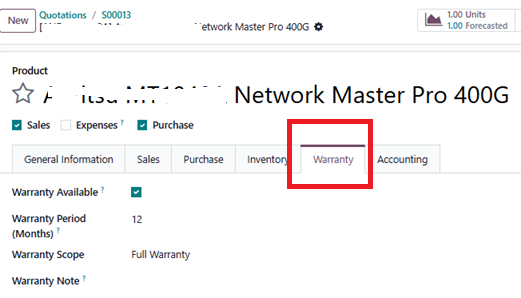
- Master product with additional Warranty information
2. SO with Smart Ribbon Warranty
3. List of all products that are under warranty and have a time period

Conclusion
Product warranty is not just an administrative note — it is part of the customer experience that can be a unique selling point if managed well. With a custom warranty tracking module integrated directly into the existing Odoo workflow, businesses do not need additional systems or manual processes to provide quick and accurate answers to customers.
Interested in implementing a similar solution for your business? The IntegraERP team is ready to assist with needs analysis and the implementation of a custom module that fits your business processes.